



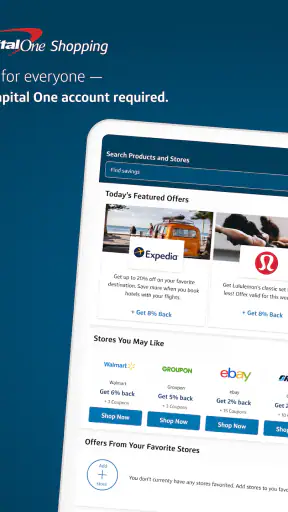
Saving money while shopping from a phone sounds simple, but the useful part is rarely the installation itself. The real test is whether an offer is easy to understand, whether it applies to the purchase I am actually making, and whether I can recover smoothly when something does not appear as expected. That is the angle I used when looking at Capital One Shopping, a free shopping app from capitaloneshopping.com.
It belongs to the shopping category and is aimed at people who want savings available while they browse or buy on the go. The app has built a strong audience, with an average rating of 4.7 from around 98 thousand ratings and more than 5 million installs. Those figures suggest that the basic idea works for many shoppers, but they do not remove the need to pay attention during checkout. In my experience, the value depends less on opening the app once and more on building a sensible routine around it.
Where the experience usually gets stuck
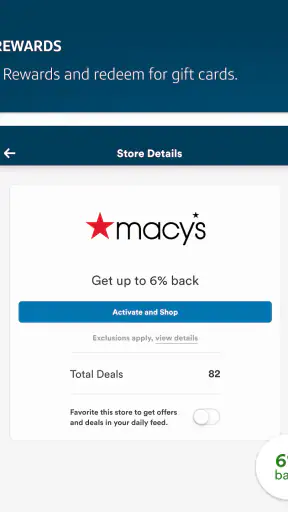
The first point of friction is expectation. A shopping-savings app can help identify an opportunity, but it cannot make every product, seller, order, or checkout qualify. I would not treat a displayed saving as a guaranteed reduction until I have checked the conditions attached to it. Product exclusions, minimum purchase requirements, timing, and the way an offer must be activated can all affect the final result.
That matters especially when I am buying something quickly from a phone. It is easy to move from a product page to payment without pausing to see whether the saving is active. If the final total looks unchanged, the immediate temptation is to blame the app. A better first step is to return to the offer details and confirm what action was required. The problem may be a missed activation step rather than a broken application.
I also found that comparison shopping takes a little discipline. The lowest visible price is not always the best overall deal once delivery costs, seller differences, product variations, or restrictions are considered. Capital One Shopping is most useful as one part of the decision, not as a replacement for reading the product page. I still compare the exact item, quantity, shipping terms, and return conditions before paying.
Another common sticking point is assuming that every saving will appear in the same form. Some benefits may be reflected during the shopping process, while others may depend on completing a qualifying action or checking the relevant account area afterward. I recommend reading the wording slowly instead of relying on a banner or short headline. That small habit prevents the most frustrating kind of surprise: believing a saving was confirmed when it was only an invitation to investigate.
The app is also less convenient for shoppers who dislike switching between screens. On a small display, moving from a retailer page to a shopping tool and back again can feel disruptive. I think it works best when I am already comparing a planned purchase, rather than when I am trying to rush through a checkout line. The more expensive or non-urgent the purchase, the more worthwhile that extra attention becomes.
What I check before trusting a saving
My first check is the exact product. A discount or reward can be tied to a particular seller, model, size, color, or category, so I do not assume that a similar-looking item qualifies. My second check is the final checkout total. If shipping, taxes, or another charge changes the calculation, the apparent saving may be smaller than it first seemed.
I also look for instructions that explain how to proceed. If the app tells me to start shopping through a particular route, I follow that route rather than opening a separate browser tab and expecting the activity to connect automatically. This is one of the most useful practical lessons: the path into a purchase can matter as much as the offer itself.
Finally, I keep a simple record of what I expected. For a larger order, I note the item, the retailer, the visible offer, and the approximate checkout total before completing the transaction. I am not creating a complicated spreadsheet; I am giving myself enough context to tell whether a result is genuinely missing or merely different from my assumption.
Setup checks that prevent avoidable problems
The current version is 2.148.0, and the app requires a device running operating system version 10 or later. Before troubleshooting anything inside the app, I check those basics. An older phone or outdated system can create behavior that looks like an offer problem when the underlying issue is compatibility. I also make sure the application itself is updated through the normal app-store process, because shopping tools can change how they display or process current offers.
Installation is only the beginning. I open the app, sign in if the experience asks me to, and confirm that I am using the account I intend to keep. This sounds obvious, but account mix-ups are easy when a phone has several email addresses or when I move between personal and shared devices. If an expected activity is not visible, I first check whether I am looking at the same account used when I began shopping.
I keep the app’s own wording in view during setup. If it presents a specific instruction, I do not replace it with a shortcut based on how another shopping app works. Different services can use different tracking or activation flows, and importing assumptions from a browser extension, a bank offer, or a retailer’s own application is a reliable way to create confusion.
My next check is the connection. I try a stable Wi-Fi or mobile-data connection, then reopen the relevant screen if the page appears incomplete. A weak connection can interrupt a product search, leave a page partially loaded, or make it seem as though an offer has disappeared. I avoid repeatedly tapping the same action while the screen is still responding, since that can make it harder to know which step actually succeeded.
Notifications and background behavior are worth considering without turning setup into a technical project. If I expect a reminder or status update, I check the phone’s notification settings and the app’s available settings. I do not assume that every phone manufacturer handles background activity identically. If the app behaves normally when open but stops updating after I leave it, the phone’s battery or background restrictions may be involved.
Privacy is another reason to read the setup screens rather than accepting everything automatically. Shopping tools naturally deal with browsing and purchase context, so I want to understand what I am enabling and which account I am using. I prefer to make those choices deliberately. That does not make the app difficult, but it does mean I would not install it casually on a device that belongs to someone else or that I do not control.
The mature 17+ content rating is also something families should notice. I would not treat this as a child-focused shopping tool, and I would keep account ownership and purchasing decisions with an adult. For my own use, the rating does not change the shopping workflow, but it is relevant when deciding whether the app belongs on a shared family device.
A setup routine I would actually use
I confirm that the phone meets the minimum operating-system requirement and that the app is current.
I open the app on a reliable connection and make sure the intended account is active.
I read the offer instructions before visiting the retailer rather than after placing an order.
I compare the exact product and total cost, including charges shown at checkout.
I keep the app available until the shopping step is clearly complete instead of closing everything halfway through.
This routine takes little time, but it separates setup errors from genuine offer limitations. It also makes the app feel less like a magic button and more like a practical shopping assistant that works best when I follow its instructions.
Recovering when a purchase or saving does not look right
When something goes wrong, I avoid immediately uninstalling the app. I begin with the least disruptive recovery steps: check the connection, close and reopen the app, revisit the relevant offer, and confirm the account. If the retailer page was opened outside the expected route, I start the shopping journey again in the way the app describes. Repeating the purchase is not something I would do blindly, but restarting the shopping session can clarify whether the original path was incomplete.
I also distinguish between a display problem and a transaction problem. If a page is blank, slow, or missing text, the issue may be temporary loading. If the page looks normal but the final purchase does not match the offer, I inspect the conditions and the exact item instead. These are different problems and deserve different responses. Clearing every setting at once usually removes useful clues.
For a pending result, patience can be more sensible than constant refreshing. I check the app again later, but I do not create duplicate purchases simply because the first result is not immediately visible. I save the order information and the offer wording so I can compare them calmly. This is particularly important for expensive items, where a mistaken second order is far worse than a delayed status update.
If the app closes or freezes, I restart it and check whether other apps are also struggling. A phone with very little free storage, heavy background activity, or a temporary system issue can make one application appear responsible. If only this app is affected, I then consider reinstalling it, but I do that only after confirming that I know the account details needed to sign back in.
Reinstallation is a useful last-resort reset, not my first troubleshooting move. It can remove local state and force a fresh start, but it does not change the terms of an offer or turn an ineligible purchase into an eligible one. I would never reinstall in the middle of a checkout unless I was certain the purchase had not been submitted and I had preserved the information I needed.
Support is more likely to be useful when I provide a clear description rather than saying only that “it did not work.” I would include the retailer, the product, the time of the attempt, the wording of the offer, the account used, and what appeared at checkout. I would avoid sharing unnecessary payment details or passwords. A concise timeline helps separate a missed activation from a technical failure.
The everyday workflow that makes the app worthwhile
Imagine I need a replacement household item but do not need it immediately. I begin by searching for the exact product in the app or using the shopping route it presents. I compare the item with the retailer’s own listing, check the final total, and read the offer conditions before proceeding. If the saving is small and another seller has easier returns or faster delivery, I choose the more practical option. If the totals are close and the offer is clear, the app earns its place in the process.
For routine purchases, I would not open the app for every low-cost item. The time spent comparing may outweigh the benefit, especially when I already know the retailer and the price is stable. I use it more deliberately for electronics, household replacements, gifts, and planned purchases where a modest reduction can justify a few extra checks.
A useful advanced habit is to separate discovery from commitment. I can use the app to identify a possible saving, then pause before paying and verify the product, seller, and terms. That pause protects me from impulse buying. It also gives me a chance to compare the same item elsewhere without treating the first displayed saving as proof that I have found the best deal.
Another practical trade-off is convenience versus control. The app can reduce the effort of looking for savings, but I give up some simplicity by adding another step to my shopping routine. I think that trade is worthwhile only when the purchase is large enough, the offer is easy to understand, or I shop frequently enough for the habit to become natural.
When the app is not the cause
Shopping problems often begin outside the shopping app. A retailer may change its price, remove an item, run out of stock, or calculate delivery differently at checkout. A bank or card account may also show a pending transaction before the merchant has completed its side of the order. In those situations, repeatedly reopening Capital One Shopping will not resolve the underlying issue.
I first identify where the discrepancy appears. If the retailer’s checkout total is already wrong, I focus on the retailer. If the retailer shows the expected amount but the app’s status looks different, I keep the order record and investigate the app side. If the payment itself is declined, I contact the payment provider or retailer rather than assuming a savings tool caused the decline.
Browser and device settings can matter too. A privacy tool, content blocker, restricted network, or aggressive battery setting may interfere with a page loading correctly or with a handoff between screens. I do not recommend disabling security protections casually. Instead, I test on a normal trusted connection and use the app’s stated workflow. If an issue appears only on one device, that comparison is useful evidence.
The same principle applies to product availability. If a deal disappears after I select a different size or seller, that may simply reflect the new item rather than an app failure. I check the exact variation again. This is one of the less obvious reasons people feel that shopping apps are inconsistent: they compare a general offer with a specific product configuration that no longer matches it.
Compared with a retailer’s own application, Capital One Shopping is more helpful when I want to consider different sellers or look for savings beyond one store’s loyalty system. A retailer app may be smoother for order history, delivery tracking, returns, and account-specific benefits. I would use the retailer’s app when those services matter most, and use this app when comparison and savings discovery are the priority.
Compared with manually searching coupon websites, the app can be more convenient because the shopping task and saving search sit closer together. Manual searching still has an advantage when I want to inspect a wide range of alternatives or verify a code independently. A browser extension can be better for people who do most of their shopping on a computer, while this mobile app makes more sense for phone-first shoppers.
I would skip it if I rarely shop online, dislike checking conditions, or want one guaranteed price with no extra steps. I would also be cautious if I am shopping under severe time pressure. In that situation, the retailer’s own checkout and support channels may be more valuable than a possible saving that requires careful verification.
My practical verdict after using it as a shopping companion
Capital One Shopping is a useful free option for people who are willing to slow down slightly before paying. Its strongest quality is not that it eliminates all shopping research; it is that it gives me another place to look for savings while I am already considering a purchase. The app feels most worthwhile when I use it for planned orders and treat every offer as something to verify rather than something automatically guaranteed.
The large user base and 4.7 average rating make it easy to understand why the app appeals to many shoppers, but my recommendation is still conditional. I would install it on a compatible phone, set up the correct account carefully, and use the five-step routine above for meaningful purchases. I would not depend on it for urgent buying, nor would I ignore shipping, returns, seller identity, or product variations just because a saving is displayed.
The developer, capitaloneshopping.com, has positioned the app around accessible savings on the move, and that focus is clear in daily use. The experience is not completely frictionless: switching between shopping steps, interpreting conditions, and checking a result can take more effort than a simple retailer checkout. Still, that effort is reasonable when the purchase is valuable enough to justify comparison.
My bottom line is simple: use it as a second set of eyes, not as a promise printed on the checkout screen. If you enjoy comparing prices and can follow an offer’s instructions, it can become a sensible part of your mobile shopping routine. If you want absolute simplicity or never want to troubleshoot a missing result, the retailer’s own app or a straightforward direct purchase will probably suit you better.


